




Giới thiệu về Command Blocks Mod for MCPE
The Command Block (ID 137) can be obtained by using the creative inventory.
The Command Block (ID 137) can be obtained by using the creative inventory. It’s a block which when triggered by a redstone signal can execute both javascript and custom mod commands.
In this example we will be using the commands available in the X-Commands mod to explain how you can use redstone and the Command Block to switch time between day and night.
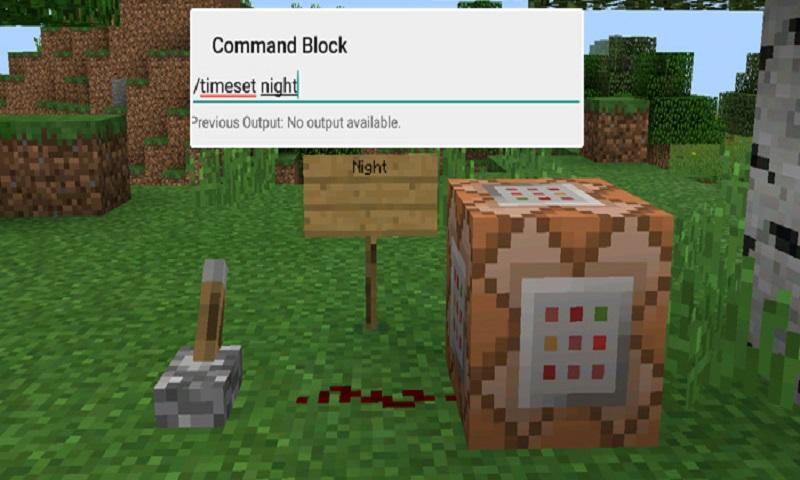
Begin by placing down the first Command Block which will be used for activating night-time. Tap on the block to set the command to use. Here you can also enter JavaScript, e.g.: javascript: Level.setRainLevel(1); – this would turn on rain
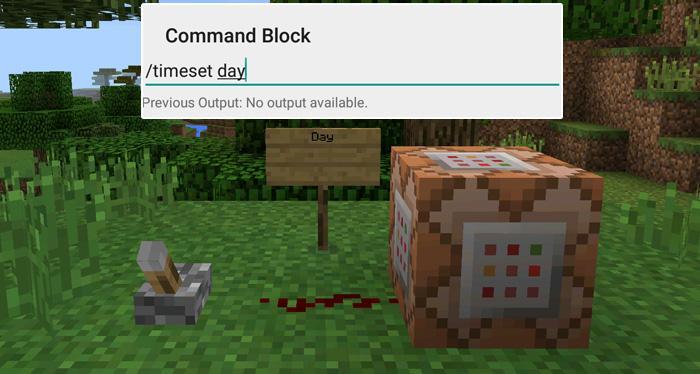
Then place down the second Command Block and let’s set it to execute the day command.
Now use the levers to trigger the redstone signal. The redstone signal will then transmit power to the Command Block which will in return execute the command it is setup to execute.
Thông tin thêm Trò chơi
Phiên bản mới nhất
1.0Được tải lên bởi
陈先进
Yêu cầu Android
Android 4.0.3+
Danh mục
Miễn phí Phiêu lưu TRÒ CHƠIXếp hạng nội dung
Everyone
Báo cáo
Gắn cờ là không phù hợpCó gì mới trong phiên bản mới nhất 1.0
Last updated on Sep 29, 2016
Phiên bản này bao gồm các bản sửa lỗi nhỏ và cải tiến chung. Hãy cập nhật lên phiên bản mới nhất để có trải nghiệm tốt nhất.
Command Blocks Mod for MCPE Ảnh chụp màn hình

Phiên bản cũ của Command Blocks Mod for MCPE
10.3 MBSep 29, 2016

Các thẻ có liên quan


![The Exorcist[Story of School] APK](https://image.winudf.com/v2/image/Y29tLnRhYm9tLnByb2plY3RzY2hvb2x1c19pY29uX3E3NDhkaGhm/icon.png?w=102&fakeurl=1)
















Hãy để lại đánh giá cho Command Blocks Mod for MCPE
Thêm Đánh giá