




About Command Blocks Mod for MCPE
The Command Block (ID 137) can be obtained by using the creative inventory.
The Command Block (ID 137) can be obtained by using the creative inventory. It’s a block which when triggered by a redstone signal can execute both javascript and custom mod commands.
In this example we will be using the commands available in the X-Commands mod to explain how you can use redstone and the Command Block to switch time between day and night.
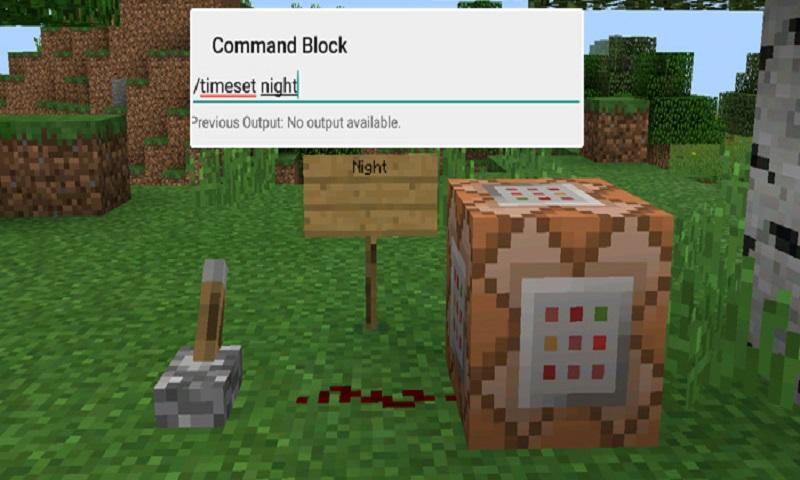
Begin by placing down the first Command Block which will be used for activating night-time. Tap on the block to set the command to use. Here you can also enter JavaScript, e.g.: javascript: Level.setRainLevel(1); – this would turn on rain
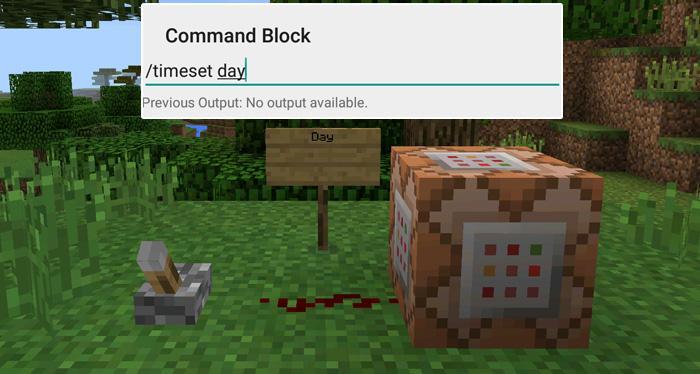
Then place down the second Command Block and let’s set it to execute the day command.
Now use the levers to trigger the redstone signal. The redstone signal will then transmit power to the Command Block which will in return execute the command it is setup to execute.
معلومات گیم اضافی
تازہ ترین ورژن
1.0اپ لوڈ کردہ
陈先进
Android درکار ہے
Android 4.0.3+
کٹیگری
مفت ایڈونچر گیممواد کی درجہ بندی
Everyone
رپورٹ کریں
فلیگ غیر موزوں ہےمیں نیا کیا ہے 1.0 تازہ ترین ورژن
Last updated on Sep 29, 2016
اس ورژن میں معمولی بگ فکسز اور عمومی بہتریاں شامل ہیں۔ بہترین تجربے کے لیے تازہ ترین ورژن پر اپ ڈیٹ کریں۔
Command Blocks Mod for MCPE اسکرین شاٹس

کے پرانے ورژن Command Blocks Mod for MCPE
10.3 MBSep 29, 2016

متعلقہ ٹیگز


![The Exorcist[Story of School] APK](https://image.winudf.com/v2/image/Y29tLnRhYm9tLnByb2plY3RzY2hvb2x1c19pY29uX3E3NDhkaGhm/icon.png?w=102&fakeurl=1)
















Command Blocks Mod for MCPE کے لیے ریویو چھوڑیں
جائزے شامل کریں