




Acerca del Command Blocks Mod for MCPE
The Command Block (ID 137) can be obtained by using the creative inventory.
The Command Block (ID 137) can be obtained by using the creative inventory. It’s a block which when triggered by a redstone signal can execute both javascript and custom mod commands.
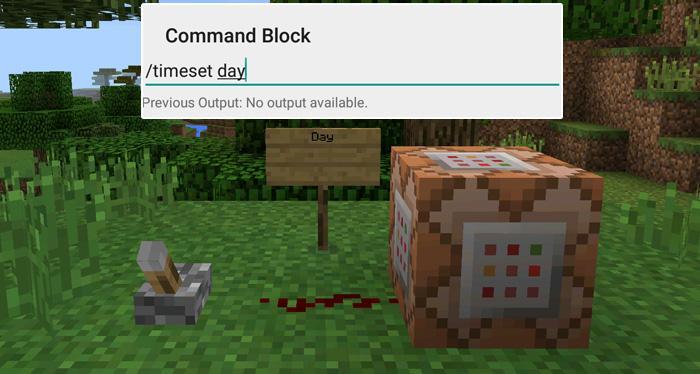
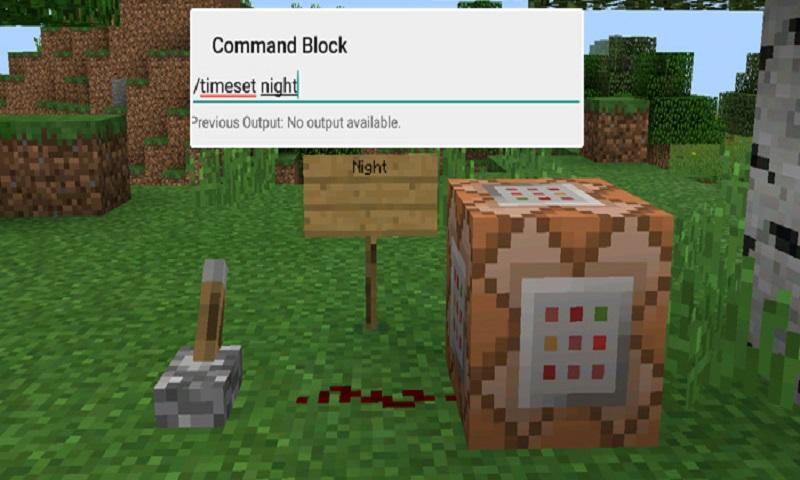
In this example we will be using the commands available in the X-Commands mod to explain how you can use redstone and the Command Block to switch time between day and night.
Begin by placing down the first Command Block which will be used for activating night-time. Tap on the block to set the command to use. Here you can also enter JavaScript, e.g.: javascript: Level.setRainLevel(1); – this would turn on rain
Then place down the second Command Block and let’s set it to execute the day command.
Now use the levers to trigger the redstone signal. The redstone signal will then transmit power to the Command Block which will in return execute the command it is setup to execute.
Información Adicional de Juego
Última Versión
1.0Presentado por
陈先进
Requisitos
Android 4.0.3+
Categoría
Gratis Aventura JUEGOClasificación de contenido
Everyone
Reportar
Marcar como inapropiadoNovedades de Última Versión 1.0
Last updated on 29/09/2016
Esta versión incluye pequeñas correcciones de errores y mejoras generales. Actualiza a la versión más reciente para disfrutar de la mejor experiencia.
Command Blocks Mod for MCPE Capturas de pantalla

Versiones Antiguas de Command Blocks Mod for MCPE
10.3 MB29/09/2016

Tags Relacionados


![The Exorcist[Story of School] APK](https://image.winudf.com/v2/image/Y29tLnRhYm9tLnByb2plY3RzY2hvb2x1c19pY29uX3E3NDhkaGhm/icon.png?w=102&fakeurl=1)




















Dejar una reseña para Command Blocks Mod for MCPE
Añadir reseñas