




عن Command Blocks Mod for MCPE
The Command Block (ID 137) can be obtained by using the creative inventory.
The Command Block (ID 137) can be obtained by using the creative inventory. It’s a block which when triggered by a redstone signal can execute both javascript and custom mod commands.
In this example we will be using the commands available in the X-Commands mod to explain how you can use redstone and the Command Block to switch time between day and night.
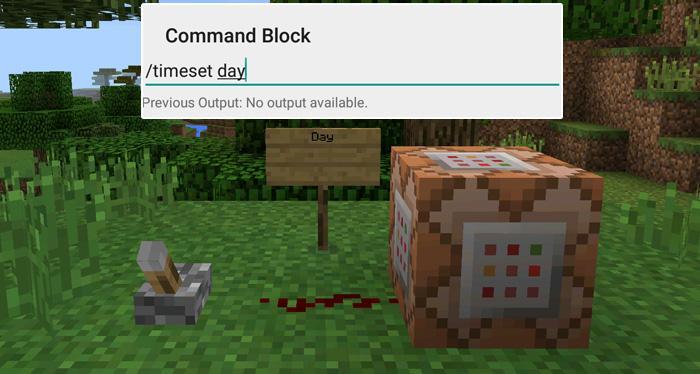
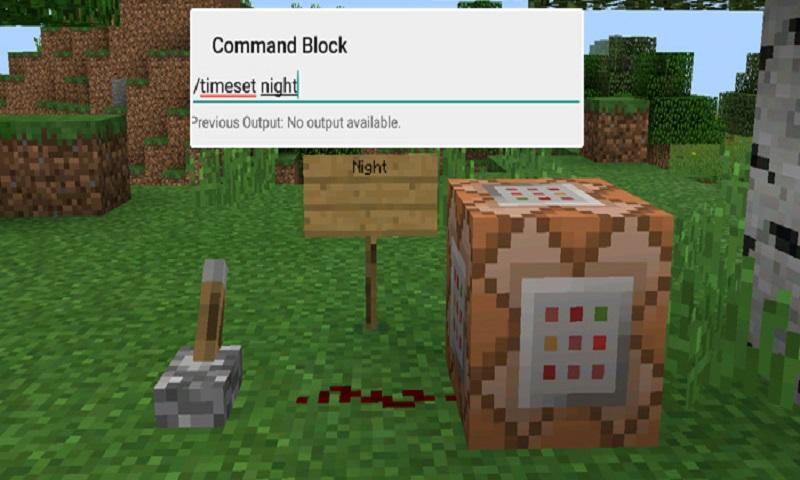
Begin by placing down the first Command Block which will be used for activating night-time. Tap on the block to set the command to use. Here you can also enter JavaScript, e.g.: javascript: Level.setRainLevel(1); – this would turn on rain
Then place down the second Command Block and let’s set it to execute the day command.
Now use the levers to trigger the redstone signal. The redstone signal will then transmit power to the Command Block which will in return execute the command it is setup to execute.
معلومات أكثر ل لعبة
احدث اصدار
1.0محمل
陈先进
Android متطلبات النظام
Android 4.0.3+
الفئة
مجاني مغامرات ألعابتقييم المحتوى
Everyone
الإبلاغ
تحديد كغير مناسبتحديث لأحدث إصدار 1.0
Last updated on 29/09/2016
يتضمن هذا الإصدار إصلاحات بسيطة للأخطاء وتحسينات عامة. حدّث إلى أحدث إصدار للحصول على أفضل تجربة.
Command Blocks Mod for MCPE لقطات الشاشة

الإصدارات القديمة لـ Command Blocks Mod for MCPE
10.3 MB29/09/2016

العلامات المتعلقة


![The Exorcist[Story of School] APK](https://image.winudf.com/v2/image/Y29tLnRhYm9tLnByb2plY3RzY2hvb2x1c19pY29uX3E3NDhkaGhm/icon.png?w=102&fakeurl=1)


















اترك تعليقاً لـ Command Blocks Mod for MCPE
إضافة تعليقات