



About ListDesktop
The simplest list desktop,Automatic sorting according to frequency of use
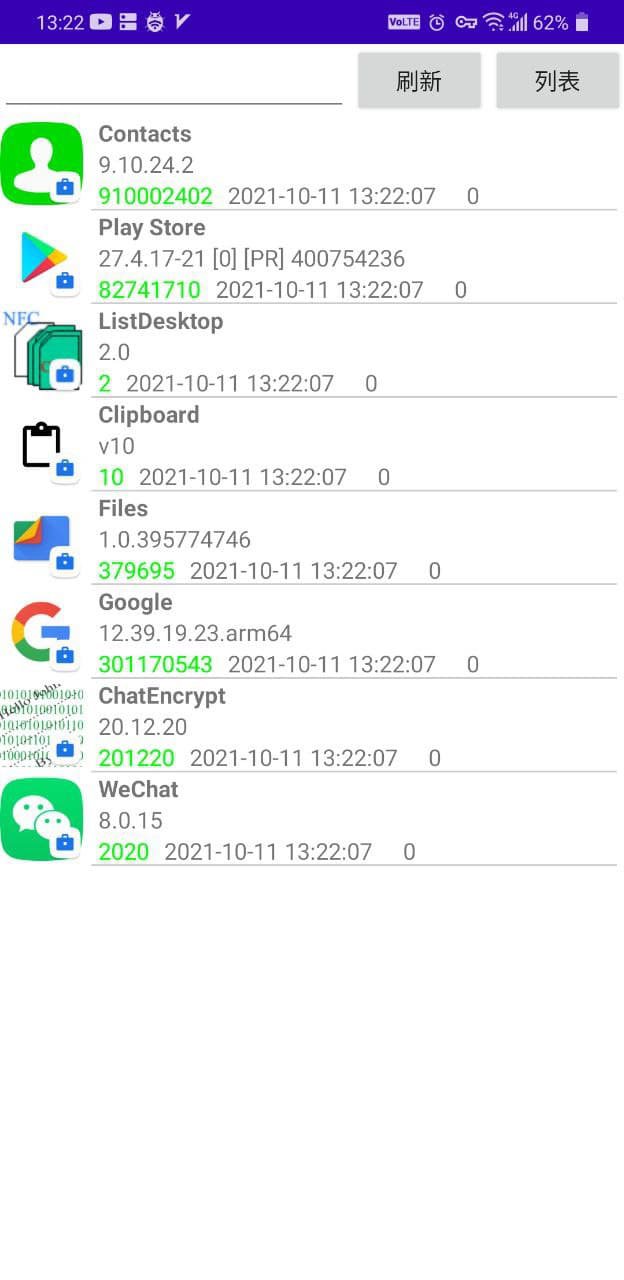
You can view the version number of the application, the time of last use, and the total number of times of use
Click to open the app
Long press the application to open the application information page provided by the system, in which you can uninstall the application or disable the application
Search for apps in the search box at the top
The number of apps in the list will be displayed immediately, and will also be displayed when searching for apps
If a new app is installed, click the refresh button to make the app visible
Any uninstalled application will not disappear from the list, but will drop to the bottom of the list. When you click on an uninstalled application, the application market will open and guide you to download the application.
You need to click the refresh button for the first use. If you need to refresh the application sequence in the future, you also need to click the refresh button. This will be automatically optimized in subsequent versions.
Additional APP Information
Latest Version
2.0Requires Android
5.0
Category
Tools AppContent Rating
Everyone
Report
Flag as inappropriateWhat's New in the Latest Version 2.0
Last updated on Oct 10, 2021
Minor bug fixes and improvements. Install or update to the newest version to check it out!
ListDesktop Screenshots



Related Tags










Popular Articles In Last 24 Hours
- Honkai Star Rail 4.4 Livestream: Release Date, Characters, Banners, and More
- BAT-BMS App Download Is Surging: Why It’s Trending and Whether It’s Safe to Install
- Brawl Stars July Update: Ramen Rebellion Theme, Noodle Shop, and More
- Minecraft 26.31: Changes, bug fixes, and new features in the Bedrock Edition hotfix




