
ListDesktop hakkında
En basit liste masaüstü, Kullanım sıklığına göre otomatik sıralama
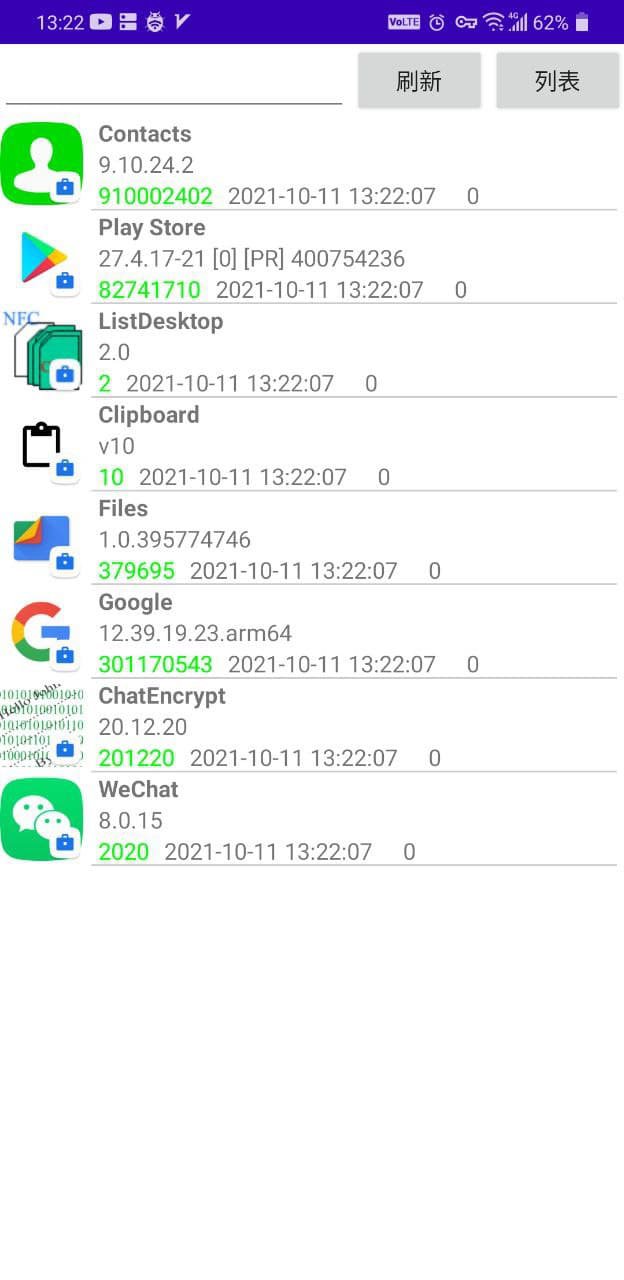
You can view the version number of the application, the time of last use, and the total number of times of use
Click to open the app
Long press the application to open the application information page provided by the system, in which you can uninstall the application or disable the application
Search for apps in the search box at the top
The number of apps in the list will be displayed immediately, and will also be displayed when searching for apps
If a new app is installed, click the refresh button to make the app visible
Any uninstalled application will not disappear from the list, but will drop to the bottom of the list. When you click on an uninstalled application, the application market will open and guide you to download the application.
You need to click the refresh button for the first use. If you need to refresh the application sequence in the future, you also need to click the refresh button. This will be automatically optimized in subsequent versions.
Ek UYGULAMA Bilgileri
En Son Sürüm
2.0Gereken Android sürümü
5.0
Kategori
Araçlar UYGULAMAİçerik derecelendirmesi
Everyone
Bildir
Uygunsuz olarak işaretleEn son sürümde yeni olan 2.0
Last updated on Oct 10, 2021
Minor bug fixes and improvements. Install or update to the newest version to check it out!
ListDesktop Ekran görüntüleri