

Package Name:dev.qaidvoid.expand
SHA-256:5360ff2c77a251f63dc214aafde8a9d4f9c14792d5deac113fad1ede943803df
Show More
Expand is a free, offline text expander for Android. Create short triggers like /addr, /sig, or /email, and Expand automatically replaces them with your full saved text. Works in any app, with your existing keyboard.
FEATURES
• Unlimited snippets, no caps, no premium tiers
• Works with any keyboard: GBoard, SwiftKey, Samsung Keyboard
• Dynamic variables: insert current date, time, clipboard contents, UUIDs, math expressions
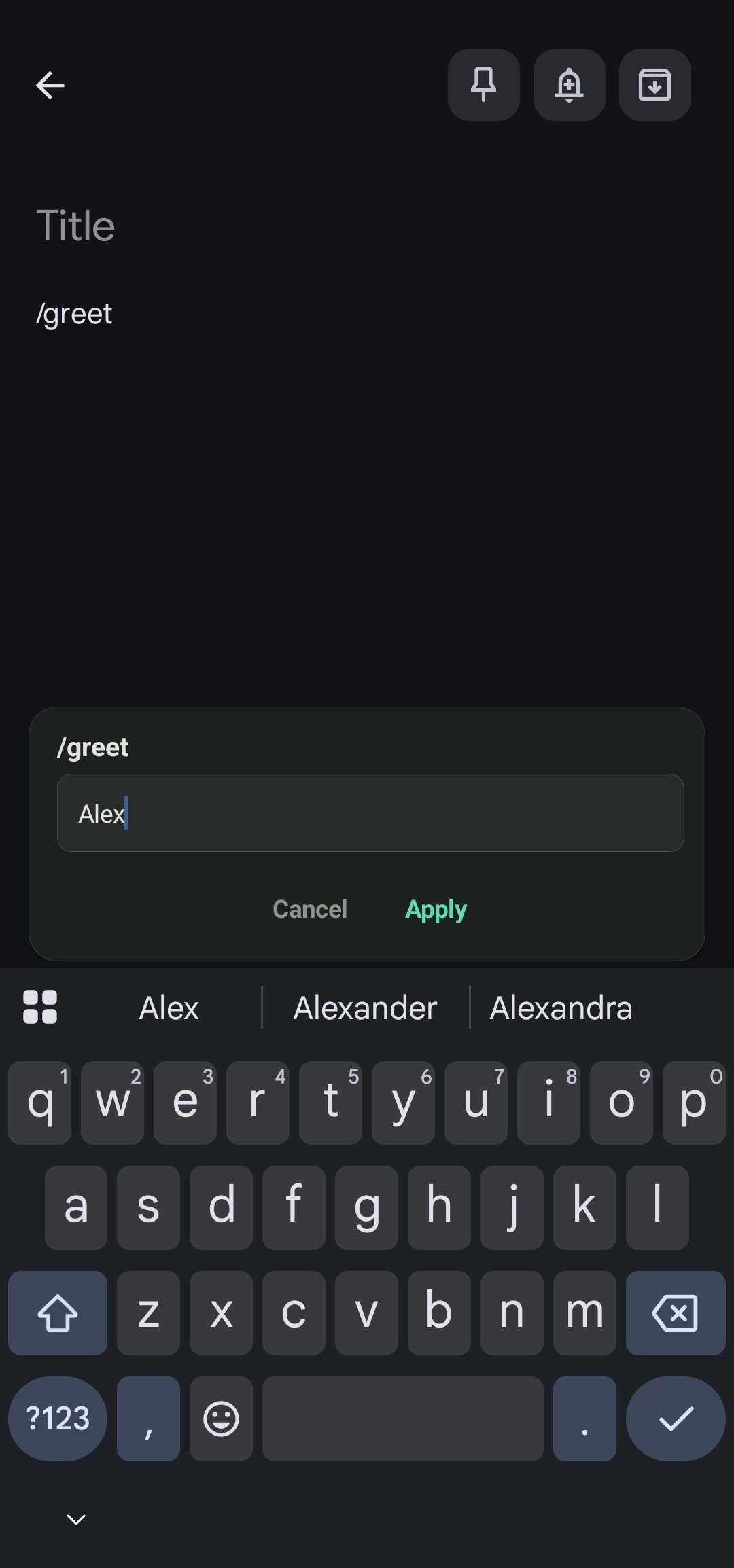
• Interactive prompts: {prompt:Name} asks for input, {choice:Mr,Ms,Mx} shows options
• Cursor positioning: place {cursor} to set where you'll type next
• Folder organization with color-coded folders
• JSON import/export, portable and human-readable
• Usage statistics: track expansions, characters saved, time saved
• Password-field safe, never expands in sensitive fields
• 100% offline with zero network permissions
• Tiny footprint, under 2 MB
HOW IT WORKS
1. Create a snippet: trigger /addr → replacement "123 Main St, Springfield, IL"
2. Type /addr in any app (Gmail, WhatsApp, Notes, Chrome...)
3. A suggestion card appears. Tap ✓ to expand.
4. Done! Your full text replaces the trigger instantly.
SUPPORTED VARIABLES
• {date} / {date:MMM d, yyyy}: current date
• {time} / {time:h:mm a}: current time
• {clipboard}: paste clipboard contents
• {cursor}: position cursor after expansion
• {prompt:Label}: ask for user input
• {choice:option1,option2}: pick from options
• {random:1-100}: random number
• {uuid}: generate UUID v4
• {math:2+3*4}: evaluate math
PRIVACY
Expand uses an Accessibility Service solely to detect trigger words in text fields. No text is logged, stored, or transmitted. The app has zero network permissions and cannot access the internet. All data stays on your device.
Latest Version
1.2.0Uploaded by
Thanakorn Supornpan
Requires Android
Android 8.0+
Category
Free Tools AppContent Rating
Everyone
Security Report
Check Now
Report
Flag as inappropriateLast updated on Aug 20, 2026
- Snippets with more than a few choices now scroll instead of being cut off
- Expanding inside a formatted email no longer strips the rest of the formatting
- New: mark a snippet as HTML to insert formatted text
- Suggestions now stay until you dismiss them, and each snippet can set its own timeout
- Drag the suggestion card by its title; the choice list itself scrolls




APKPure - A multi-platform app store primarily focused on Android, providing extensive app-related content. Discover the app you want easier, faster, and safer, with quick and efficient downloads and installations.