


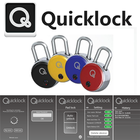

Über TheQuickLock
TheQuickLock Ihre SafeTech Padlock verwalten, mit schnellem Zugang und Benutzerfreundlichkeit.
Your QuickLock Padlock has RF (Radio Frequency) capabilities that can be enabled with a tag, ring, bracelet, fob or card. This App only executes the Bluetooth aspects of your padlock while allowing you to see which person/method recently opened your security device. Once the App is installed and open on your hand held device, follow these instructions:
1. Depress the black button on the face of the Padlock, a blue light will flash.
2. Simultaneously, your Android will work to pair with the Padlock. This first time, you’ll be prompted to enter an initial password which is – 12345678.
3. The display will show the ‘lock – unlock’ button on your display. From the page, user is able to unlock and/or designate the auto unlock for each time the app is used and the black button on the Padlock is depressed.
4. Depress the settings COG in the bottom right-hand corner to alter password, change user, etc.
Security access and inventory management application
Zusätzliche APP Informationen
Aktuelle Version
2.2.1.9Von hochgeladen
Antonio Linares
Erforderliche Android-Version
Android 4.3+
Kategorie
Gratis Tools APPAltersfreigabe
Everyone
Was ist neu in der neuesten Version 2.2.1.9
Last updated on Mar 6, 2017
Increase the end-user license agreement
TheQuickLock Screenshots



Verwandte Tags








Beliebte Artikel in den letzten 24 Stunden
- Anleitung zum Download die neueste Version von Post & DHL APK für Android 2026
- Anleitung zum Download die neueste Version 6.0302 von VidMate - HD Video Downloader & Live TV APK für Android 2026
- Anleitung zum Download die neueste Version von YouTube APK für Android 2026
- Anleitung zum Download die neueste Version 1.01.5806 von APKPure APK für Android 2026





Hinterlassen Sie eine Bewertung für TheQuickLock
Bewertungen hinzufügen