


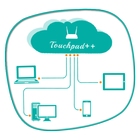

关于Remote Desktop - Touchpad++
它可以让你与你的手机/平板电脑控制您的电脑。
Want to feel your normal PC screen to touch screen. Then Try Touchpad++. It will realize you are working with touch screen computer. It allows you to control your PC with your phone/tablet.
How to use?
Download Touchpad++ server setup for window PC : http://bit.ly/1jfpyHO
•Install program on Pc, then Run it as administrator.
•Make sure PC and Android phone are in the same network. You can use android phone as portable hotspot and connect to PC.
•Run app on Android phone, then input IP address of PC and click “connect”.
Thank you.
Hope you Enjoy it.
更多应用信息
最新版本1.1更新日志
Last updated on 2016年06月30日
此版本包含小幅错误修复和常规改进。请更新至最新版本,以获得更佳体验。
Remote Desktop - Touchpad++ 屏幕截图


Remote Desktop - Touchpad++历史版本
11.2 MB2016年06月30日

相关标签
















为Remote Desktop - Touchpad++留下评论
添加评论