
Giới thiệu về Multi Window
Bây giờ Thưởng thức Với kinh nghiệm Window đa Trong Điện thoại di động của bạn cũng.
Now Enjoy With Multi Window Experience In Your Mobile Phone Also. Install This Free Tool To Create Your Favorite List Of Installed Icons In Your Phone. And Easily Switch From One Task To Another During Your Current Task.
This app makes all apps multi window capable, but only adds the ones you specify to the launch tray. This means you can drag an app from the launch bar onto ANY app and it will launch in split screen...even apps that aren't explicitly selected to be enabled for multi window.
Now Enjoy With Multi Window Experience In Your Mobile Phone Also. Install This Free Tool To Create Your Favorite List Of Installed Icons In Your Phone. And Easily Switch From One Task To Another During Your Current Task.
Multi Window : Split Screen Is the app by which we can An App By Which You Can Create Shortcuts Of Your Installed Apps Icon Into Multiple Window Tray. And By Clicking On These Shortcuts, You Can Easily Switch From One Task To Another During Your Current Task.
Each floating app is a small application that opens in a window and floats over all other applications allowing real multitasking on your android phone or tablet. Just open floating app and experience multitasking like on your Windows or Mac.
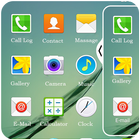
Side Bar Multi Window is a free application to provide you the ease of accessing your applications from anywhere. It is just a side launcher with your favorite applications. Shortcuts of your selected favorite applications
will be created on the left of the screen and it will always be there at top for giving you the access for these applications anywhere anytime.
You Can Also Create Shortcuts Of Your Installed System Apps Icon Into Multi Window Tray.
And By Clicking On These Shortcuts Icons, You Can Easily Switch From One Task To Another During.
Sidebar Multiwindow,You Can Also Create Shortcuts Of Your Installed System Apps Icon Into MutiWindow Tray.
It is just a side launcher with your favorite applications.
Key Features Of Multi Slidebar App ::
-> No root required
> Long press and Drag Drop Icons On Screen For Open App.
-> You Can Increase And Decrease Speed Of Multi Window Tray.
-> You Can Arrange Icons.
Types: Most used app, Recently used app and Alphabetical Order.
-> You Can Select Many Different Default Themes.
-> You can hide and unhide On long pressing multi window Sidebar icon. (Follow Help )
-> You can change transparency of slide bar.
-> Customize color, animation speed,order and opacity.
Thông tin thêm Ứng dụng
Phiên bản mới nhất
1.1.3Được tải lên bởi
Johnemar Ferreira
Yêu cầu Android
Android 4.0+
Danh mục
Miễn phí Công cụ ỨNG DỤNGXếp hạng nội dung
Everyone
Báo cáo
Gắn cờ là không phù hợpCó gì mới trong phiên bản mới nhất 1.1.3
Last updated on Jan 24, 2020
Add more features of multiple app
Change Graphics.
Reduce ads Popup.
Add new theme.
Multi Window Ảnh chụp màn hình