Giới thiệu về Full Functionality For Wear OS
These watch faces run on Wear OS
Full Functionality For Wear OS
These watch faces run on Wear OS
Custom: When the background is dark, the data needs to be set to light. When the background is light, the data needs to be set to dark
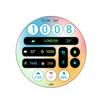
1. Top: Calories, distance, time, morning and afternoon, 24-hour progress bar, heart rate (click to check), heart rate percentage progress bar
2. Middle: Step count (not clickable), Step target percentage progress bar, Year, Date, Week
3. Bottom: Battery level
Compatible with devices: Pixel Watch, Galaxy Watch 4, Galaxy Watch 5, Galaxy Watch 6 and other devices
How do I install the watch face on WearOS ?
1. Install it from Google Play Wear Store on your watch
2. Install the companion app for fully customization (Android phone devices)
Thông tin thêm Ứng dụng
Phiên bản mới nhất
1.0.0Yêu cầu Android
11
Danh mục
Cá nhân hóa ỨNG DỤNGXếp hạng nội dung
Everyone
Báo cáo
Gắn cờ là không phù hợpCó gì mới trong phiên bản mới nhất 1.0.0
Last updated on Apr 12, 2024
Phiên bản này bao gồm các bản sửa lỗi nhỏ và cải tiến chung. Hãy cập nhật lên phiên bản mới nhất để có trải nghiệm tốt nhất.
Full Functionality For Wear OS Ảnh chụp màn hình