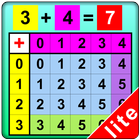

關於Activity Using Add Table Lite
交互式應用程序精簡版的版本,以幫助學習活動使用加法表
An incomplete number statement (for instance, 2+3 = ) appears at top of the screen. The program tells the student to click on the first number (2) which is highlighted in red in the left column, and then to click on the second number (3) which is highlighted in green in the top row. The answer (5) now gets a blue highlight, and the program tells the student to click on the answer. The answer moves up into the missing space in the number statement, and the program voice says “two plus three is five."
最新版本1.1更新日誌
Last updated on 2016年04月07日
This new updated version provides a full screen display regardless of the size of the devices.
Activity Using Add Table Lite 螢幕截圖


Activity Using Add Table Lite歷史版本
17.4 MB2016年04月07日

相關標籤
Activity Using Add Table Lite相關應用

Tixoo - Long division
0.0

Multiplication By Grouping Objects Lite version
0.0

Multiplication Using Calculator Lite version
0.0

Multiplication Using Number Line
0.0

Multiplication Using Number Line Lite version
0.0

Multiplication Using Multiplication Table
0.0
Multiplication By Grouping Obj
0.0

Multiplication of Multiple-Digit Numbers
0.0