

เกี่ยวกับ Wake Remote Lan
Enjoy millions of the latest Android apps, games, music, movies, TV, books, magazines & more. Anytime, anywhere, across your devices.
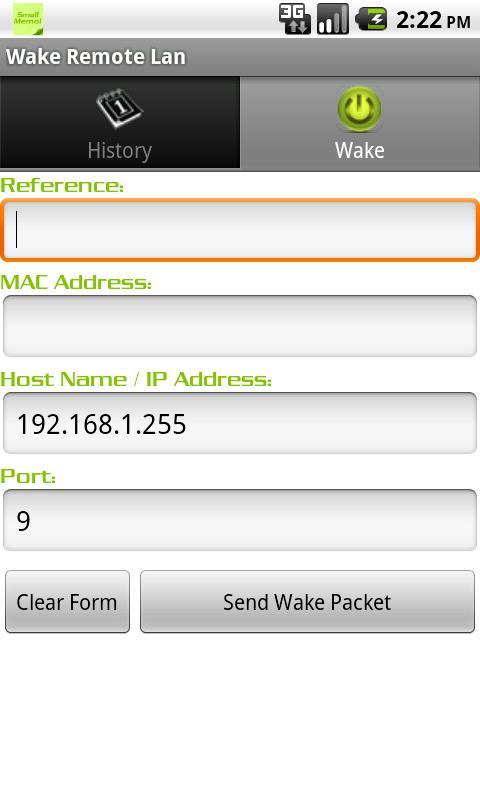
This application allows you to send MAC Magic Packet.
Many PCs and servers support the technology network wake-up (Wake-on-LAN, WoL). These computers can be enabled remotely by sending the appropriate command from the LAN.
To send a "magic packet", you simply enter the desired MAC-adres.After this "magic packet" is sent to the specified MAC-address and the remote computer is turned on.
The behavior of the WoL depends on several factors, such as hardware and network configuration.
To turn the computer on the LAN need to be supported by a network card feature Wake on Lan. Enabling Wake implemented in the BIOS.
Turn your computer can only be from the regime of soft off - partial shutdown. In this mode after the computer goes off by means of windows, click on the keyboard or system unit, and is in this mode as long as the system unit is not disconnected from the network. After a complete disconnect from the network (off UPS or surge protector, or power cord is pulled), the computer is in power off (completely off), so that after power-WOL function does not work.
ข้อมูล แอป เพิ่มเติม
เวอร์ชันล่าสุด
1.2อัปโหลดโดย
Vaghera Bharat
ต้องใช้ Android
Android 2.2+
Category
ฟรี เครื่องมือ แอปการจัดประเภทเนื้อหา
Unrated · Warning – content has not yet been rated. Unrated apps may potentially contain content appropriate for mature audiences only.
รายงาน
ปักธงว่าไม่เหมาะสมมีอะไรใหม่ใน 1.2 เวอร์ชันล่าสุด
Last updated on Nov 2, 2015
Version 1.1
Wake Remote Lan ภาพหน้าจอ
Wake Remote Lan รุ่นเก่า
143.3 KBNov 2, 2015