



About Recent Plus
Enjoy millions of the latest Android apps, games, music, movies, TV, books, magazines & more. Anytime, anywhere, across your devices.
WARNING: this app is mostly useless, unless you have a Nook Color running Cyanogenmod 7!
also see: http://forum.xda-developers.com/showthread.php?t=1007064
What is Recent Plus!?
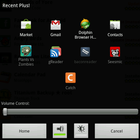
It is a small app that replaces the "recent apps" dialog that appears when you long-press the home button. It shows the recently opened apps as before but additionally shows a volume slider. See screenshots. Requires CM7.
Why?
As you all know, the nook color is a wonderful device but it is lacking hardware buttons. A typical and really nice remedy is to install keysmod / Hard-key editor and bind the volume buttons to back and menu. Problem: you can no longer easily change the current volume while in an app, especially when it is running in fullscreen.
It started with this post and I am now moving it here.
Requirements:
* a device running a recent nightly of cyanogenmod 7
Installation:
(0. install the keysmod so you have back/menu instead of the volume buttons)
1. go to "Settings", "Cyanogenmod Settings", "Input", "long-press home settings": check "Use custom application" and then choose "Select custom application", tap "Applications" (yes, another tap here in that list! This is the first entry), finally select "Recent Plus!"
2. done. Now you can long press home to switch apps and change the volume
Additional APP Information
Latest Version
1.1Uploaded by
ASwe
Requires Android
Android 2.3.2+
Category
Free Productivity AppContent Rating
UnratedWarning – content has not yet been rated. Unrated apps may potentially contain content appropriate for mature audiences only.Learn More · Unrated
Report
Flag as inappropriateWhat's New in the Latest Version 1.1
Last updated on Oct 16, 2015
v1.1: (April 25, 2012)
fix long-press not working (introduced in 1.0)
v1.0: (April 18, 2012)
fix switching to some apps (thanks arda99!)
v0.9: (August 2, 2011)
remove bogus lower brightness level function
code cleanup
v0.8: (July 31, 2011)
long press opens application settings
new toggle to enable even lower brightness levels
Recent Plus Screenshots


Old Versions of Recent Plus
31.6 KBOct 16, 2015

Related Tags
















Leave a review for Recent Plus
Add Reviews