




About PACKER
Premium Design introduced by watch face app 'TIMEFLIK
[TIMEFLIK's Watch Face Collection, Premium Design]
***This app is a standalone watch app.
It can be installed and operated in your smartwatch only.
The compatibility warning message from Google Play indicates that it is a watch-only app.
There is no problem with the use, so please don’t be confused.
[How to use]
After downloading, change the watch face by touching the screen for a while.
If your watch is a Galaxy watch, you can also change it from [Galaxy Wearable] > [Watch faces].
_______________________________
[Key Features]
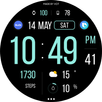
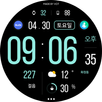
- Digital Time
- 12/24H Format
- Day of Month
- Date
- Week in Year
- Battery Status
- Step Counts
- Moon Phase
- 2 Fixed Complication
- 3 Editable Complication
- 4 Preset Shortcut
- 10 Theme Colors
- Always On Display
[Troubleshooting]
Please let us know the information below to help@apposter.com.
Our development team will try to reproduce and solve it.
*This watch face supports wear OS devices.
_______________________________
**How to set a Phone Battery Level**
https://play.google.com/store/apps/details?id=com.weartools.phonebattcomp
1. Install the Phone Battery Level app on both the phone and the watch.
2. Select Phone Battery Level in Complications.
Additional APP Information
Latest Version
Varies with deviceRequires Android
Category
Personalization AppContent Rating
Everyone
Report
Flag as inappropriateWhat's New in the Latest Version Varies with device
Last updated on May 19, 2025
Minor bug fixes and improvements. Install or update to the newest version to check it out!
PACKER Screenshots


![[FREE] Luminate Shadow APK](https://image.winudf.com/v2/image1/Y29tLmFwcG9zdGVyLmx1bWluYXRlc2hhZG93X2ljb25fMTc1ODY2MDAyNl8wNTA/icon.png?w=102&fakeurl=1)









