


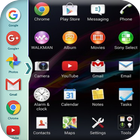

About Multi Window
Multi Window - Split Screen & Slide Bar
==> Now Enjoy With Multi Window Experience In Your Mobile Phone Also.
==> Install This Free Tool To Create Your Favourite List Of Installed Icons In Your Phone.
=====>>> Types: Most used app, Recently used app and Alphabetical Order. <<<=====
==> You Can Select Many Different Default Themes.
==> You can hide and unhide On long pressing multi window Sidebar icon. (Follow Help )
==> You can change transparency of slide bar.
==> Customize color, animation speed,order and opacity.
==> Service start automatically when phone restart Fix.
=====>>> Features <<<=====
==> No root required
==> Long press and Drag Drop Icons On Screen For Open App.
==> You Can Increase And Decrease Speed Of Multi Window Tray.
==> You Can Arrange Icons.
==> Multi Window Is the app by which we can An App By Which You Can Create Shortcuts Of Your Installed Apps Icon Into Multiple Window Tray.
==> And By Clicking On These Shortcuts, You Can Easily Switch From One Task To Another During Your Current Task.
==> You Can Also Create Shortcuts Of Your Installed System Apps Icon Into Multi Window Tray.
Thank You...!!!
Additional APP Information
Latest Version
1.0Uploaded by
Maro Said
Requires Android
Android 4.0.3+
Category
Free Tools AppContent Rating
Everyone
Report
Flag as inappropriateWhat's New in the Latest Version 1.0
Last updated on Aug 23, 2017
This release includes minor bug fixes and general improvements. Update to the latest version for the best experience.
Multi Window Screenshots


Old Versions of Multi Window
5.4 MBAug 23, 2017

Related Tags
















Leave a review for Multi Window - Split Screen & Slide Bar
Add Reviews