




About Kingo ROOT

Reviewed byBernadine WisokyContent Editor
Kingo ROOT is a rooting utility app that grants superuser access on Android with a single tap.
Kingo ROOT offers two ways to attempt root on your device. The on device Kingo ROOT APK is quick to set up and focuses on convenience, while the desktop client aims for broader device coverage. The process is guided by a simple interface that shows progress and status, and there is also a built in unroot option to revert. Results always depend on the device model, bootloader state, and security patches. Therefore, success is never guaranteed. You can download Kingo ROOT on APKPure and check out the Kingo ROOT APK latest version to try the method that fits your situation.
Key features
One tap root
Kingo ROOT attempts to grant superuser access with a single action. You tap the main button, wait for the progress bar, and then review the outcome shown on screen.
APK and PC options
You can start with the Kingo ROOT APK for speed and simplicity. Moreover, you can try the PC client later to target more models when the on device method does not succeed.
Broad device coverage
Kingo ROOT is designed to handle many chipsets and vendor skins. Therefore, it adapts its approach during the attempt and reports whether your device is supported or requires the PC route.
Quick unroot
Kingo ROOT includes a one tap unroot function. In addition, it removes granted permissions so you can restore a non rooted state and continue with regular updates where possible.
Simple guided interface
The app uses clear buttons, status messages, and logs. Therefore, you always see what is happening, when the device reboots, and whether root was successful or needs another method.
Kingo ROOT safety notes and file integrity
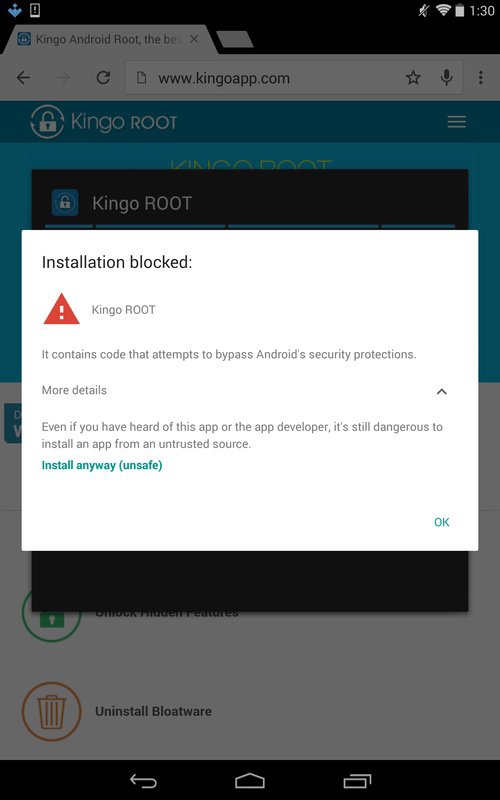
Kingo ROOT modifies core settings to gain elevated access. Therefore, Android may show an Install anyway prompt for unknown apps, and some security tools classify rooting utilities by behavior. This prompt does not confirm malware by itself. It is a standard warning because the app can change system components.
Always download Kingo ROOT APK from APKPure and verify the file details shown on the download page. Moreover, you can compare the checksum with a local hash tool for extra assurance and review requested permissions before installing. Avoid modified packages labeled as MOD or patched builds, since these may add unwanted code.
Some browsers display a Safe Browsing warning for the developer website. That notice relates to the website, not to APKPure mirrors. Therefore, get the Kingo ROOT APK latest version here, validate its hash, and proceed only if you understand the implications of rooting.
Kingo ROOT compatibility and expectations
Rooting success varies widely. Devices with locked bootloaders and recent security patches often block one tap methods. Therefore, expect mixed results on newer models, and consider trying the PC client if the APK attempt fails.
The APK approach focuses on convenience without a computer. In addition, the PC method can communicate at a deeper level over USB, which may improve the chance on certain devices. However, neither path can guarantee results on every firmware build.
If your device supports official bootloader unlocking, some users prefer patching the boot image and managing root with tools like Magisk. That path requires more steps and technical knowledge. Kingo ROOT targets users who want a guided one tap attempt first, then a quick unroot if needed.
How to use Kingo ROOT
This guide covers both the APK method and the PC approach. Read each step fully before you start, and back up your important data. Proceed only if you accept the risks involved with rooting.
- Download Kingo ROOT APK latest version from APKPure and install it. If prompted, allow your browser or file manager to install unknown apps.
- Open Kingo ROOT and tap One Click Root. Keep the device powered and avoid interacting until the progress indicator finishes and the status message appears.
- After the device reboots or the app reports success, confirm root by opening a root checker app or by observing superuser prompts when an app requests elevated access.
- Then, if the APK attempt does not work, use the KingoRoot PC client on a computer. Enable USB debugging in Developer options, connect with a reliable cable, and start the root process from the desktop client.
- So, if you want to revert, open Kingo ROOT and choose Unroot. Wait for completion, then reboot and confirm that root access is no longer available.
Download and start now
Kingo ROOT provides a straightforward attempt at superuser access with the flexibility of APK and PC methods. Get the Kingo ROOT APK on APKPure, try the on device route, and switch to the desktop client if your model requires it.
FAQs
Where can I download the Kingo Root APK?
You can download Kingo ROOT on APKPure. Open this page, tap the download button, and install the Kingo ROOT APK latest version to start the one tap process on your device.
Does KingoRoot work on Android 14?
Kingo ROOT may not succeed on many devices running the newest firmware due to stronger security and locked bootloaders. You can try the APK first, and if it fails, attempt the PC method, but understand that success is not guaranteed on recent builds.
Is there a PC version of KingoRoot?
Yes, KingoRoot PC is a Windows client that attempts root over USB and often targets more device models than the APK alone. APKPure provides the Android Kingo ROOT APK for on device rooting, and you can use the PC client if you already have it available.
Why does Android warn that installing Kingo ROOT is unsafe?
Android flags apps that can change system settings, so Kingo ROOT triggers an unknown apps or similar warning by design. This warning highlights potential risk; it does not confirm that the APK from APKPure is harmful. Install only if you understand rooting and accept the consequences.
Why do some browsers show a malware warning for the developer site?
Some browsers display a Safe Browsing interstitial for the developer domain, which is a website level warning. The Kingo ROOT APK provided on APKPure is a direct download hosted here. Always verify the file hash, check permissions, and proceed only if you trust the source and the process.
Additional APP Information
Latest Version
4.7.0Uploaded by
Kingosoft Technology Ltd.
Requires Android
Android 4.4+
Category
Free Tools AppReport
Flag as inappropriateWhat's New in the Latest Version 4.7.0
Last updated on Dec 17, 2024
Minor bug fixes and improvements. Install or update to the newest version to check it out!
Kingo ROOT Screenshots


Old Versions of Kingo ROOT
6.2 MBDec 17, 2024



![[root] FlashFire APK](https://image.winudf.com/v2/image/ZXUuY2hhaW5maXJlLmZsYXNoX2ljb25fMTUwNTk5MjE1OV8wODU/icon.png?w=102&fakeurl=1)


![Kingo SuperUser [ROOT] APK](https://image.winudf.com/v2/image/Y29tLmtpbmdvdXNlci5jb21fNXlrZDJvNjQ/icon.png?w=102&fakeurl=1)






