
Tentang Data Backup Free
FILE, direktori, SMS, CADANGAN UNTUK SD CARD, FTP atau E-MAIL
FILE, DIRECTORY, SMS, BACKUP TO SD CARD, FTP or E-MAIL
Backup your photos, files, folders or SMS messages automatically to your SD card, FTP server or send to your e-mail address.
You can set many "backup-rules" to save your important files, folders, or SMS messages from your device.
Example:
If you want to save automatically every day or every hour etc. your new photos from SD card to your FTP, you can add a new "rule" in "List of rules" and complete the following settings:
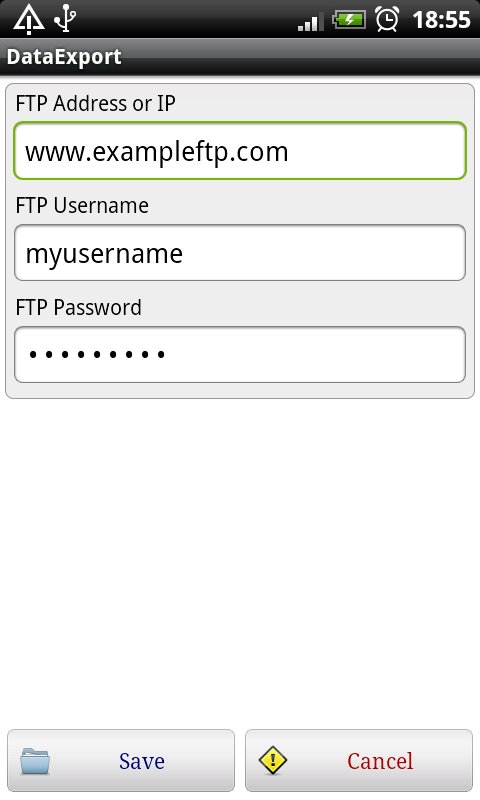
- first you need to set up your FTP access in main menu "FTP"
- go to "List of rules" menu and press the "New" key
- add a name to your new rule, select the type of source (File, Directory, SMS), select the target type (Move to: E-mail, FTP, SD card), select the source and target path (to select a directory, tap and hold the item), and the occurence (Check every: x-minute, hour, day, month). Save the rule.
You can set the following rule types:
Directory ---> SD card
Directory ---> FTP
Directory ---> E-mail
File ---> SD card
File ---> FTP
File ---> E-mail
SMS ---> SD card
SMS ---> FTP
SMS ---> E-mail
- If you have a rule to save a directory every day, when the application run 2. time, will save only the new or modifyed files
- You can edit the rules in "List of rules" menu by tap and hold the item.
- If you don't have SMTP access to send outgoing e-mail messages, you can use your G-Mail free SMTP:
go to application main menu: "E-mail" and make the following setting:
SMTP Address or IP: smtp.gmail.com
SMTP User: Your G-Mail email address
SMTP Password: your G-Mail password
SMTP Port: 465
Informasi APL tambahan
Versi Terbaru
3.2Diunggah oleh
Phatboi Rosokou
Perlu Android versi
Android 4.0.3+
Kategori
Gratis Alat APLIKASIRating konten
Everyone
Apa yang baru dalam versi terbaru 3.2
Last updated on Jan 23, 2016
Versi ini berisi perbaikan bug kecil dan peningkatan umum. Update ke versi terbaru untuk mendapatkan pengalaman terbaik.
Data Backup Free Tangkapan layar