


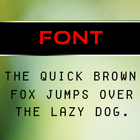

About Bubble Fonts Pack
Font Pack For Android
Bubble Font Pack can be launched through Go Launcher EX program.
This font pack changes the UI of your mobile screen to a great extent.
How to apply - After installing and Applying Go Launcher EX , on the Home Screen press the menu button, it will pop up several options on your screen. From there do as follows -
Go settings - > Personalization -> Fonts -> Scan Fonts -> Bubble Font Pack
After installation open the application, it will guide to apply the "Bubble Font Pack" through Go Launcher EX.
Note - To apply this font pack Go Launcher EX application is mandatory.
Additional APP Information
Latest Version
1.0Uploaded by
Paul Rios
Requires Android
Android 4.0.3+
Category
Free Personalization AppContent Rating
Everyone
Report
Flag as inappropriateWhat's New in the Latest Version 1.0
Last updated on Mar 8, 2016
This release includes minor bug fixes and general improvements. Update to the latest version for the best experience.
Bubble Fonts Pack Screenshots


Old Versions of Bubble Fonts Pack
1.8 MBMar 8, 2016

Related Tags












Leave a review for Bubble Fonts Pack
Add Reviews