



About PDF editor-Compress Split Sign
Merge, split, compress, edit, sign, convert, encrypt, watermark & rotate PDFs.
PDF Toolkit is your all-in-one, privacy-first PDF app. Every document operation runs entirely on your device — your files are never uploaded to any server. No cloud processing and no document data collection. Just fast, reliable PDF tools in your pocket.
🔒 ON-DEVICE PROCESSING & PRIVATE
All document processing happens locally on your phone. Your sensitive files never leave your device. We believe your documents are your business — and nobody else's.
━━━━━━━━━━━━━━━━━━━━━━━━━━━━
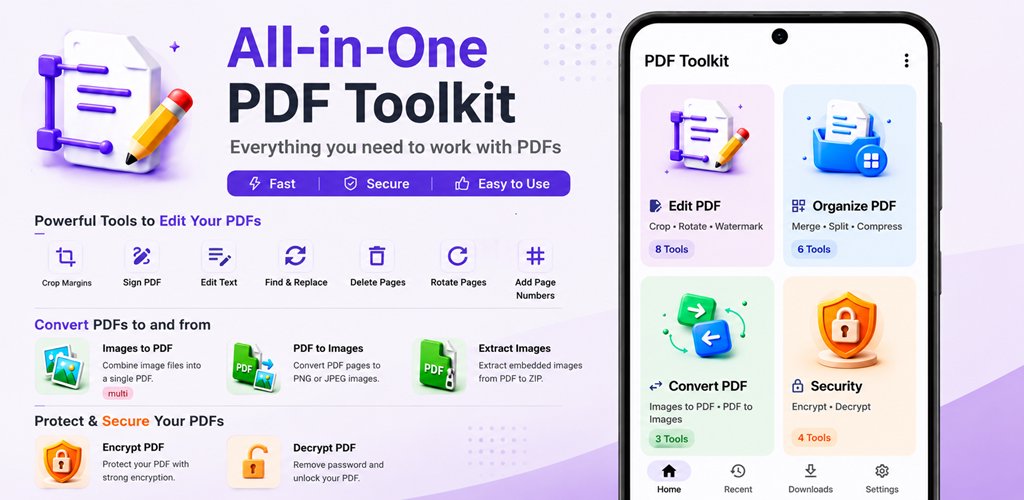
✏️ EDIT PDF
• Edit Text — Tap any line and rewrite it directly in your PDF
• Find & Replace — Search for text and replace it across all pages
• Sign PDF — Draw your signature and place it on any page
• Crop Margins — Trim white space and adjust page margins
• Rotate Pages — Fix page orientation (90°, 180°, 270°)
• Delete Pages — Remove unwanted pages instantly
• Add Page Numbers — Stamp page numbers in your preferred style and position
• Search Text — Find every occurrence of a phrase and highlight matches
📂 ORGANIZE PDF
• Merge PDF — Combine multiple PDFs into a single document
• Split PDF — Break a PDF into equal chunks or custom page ranges
• Extract Pages — Pull out specific pages into a new PDF
• Rearrange Pages — Drag and reorder pages however you like
• Reverse Pages — Flip the entire page order
• Compress PDF — Reduce file size with multiple quality presets (Balanced, Smaller, Maximum, Lossless)
🔄 CONVERT PDF
• Images to PDF — Convert JPG, PNG, and other images into a single PDF
• PDF to Images — Render PDF pages as PNG or JPEG at custom DPI
• Extract Images — Pull out embedded photos losslessly from any PDF
🛡️ SECURITY
• Encrypt PDF — Protect documents with AES-256 encryption and password
• Decrypt PDF — Remove password protection from PDFs you own
• Set Permissions — Control printing, copying, editing, and annotation access
• Watermark — Stamp text or image watermarks across pages for branding
━━━━━━━━━━━━━━━━━━━━━━━━━━━━
⚡ WHY CHOOSE PDF TOOLKIT?
✅ On-Device Processing — No cloud uploads for your files
✅ Privacy First — Your files never leave your device
✅ Fast Processing — Powered by an on-device PDF engine
✅ 20+ Tools — Everything you need in one app
✅ Advanced Compression — Multiple presets including lossless mode
✅ Clean & Modern UI — Intuitive Material Design interface
✅ Supports Large Files — Handle PDFs up to 200 MB
✅ No Watermarks on Output — Your processed files are clean
✅ Ad-Supported — Supported by non-intrusive ads
━━━━━━━━━━━━━━━━━━━━━━━━━━━━
📋 PERFECT FOR
• Students — Merge lecture notes, extract pages for study guides
• Professionals — Sign contracts, compress reports, encrypt confidential files
• Anyone — Convert photos to PDF, remove passwords, add page numbers
━━━━━━━━━━━━━━━━━━━━━━━━━━━━
Download PDF Toolkit today and take full control of your PDFs — privately, locally, and on your terms.
Additional APP Information
Latest Version
Varies with deviceRequires Android
Category
Free Productivity AppContent Rating
Everyone
Report
Flag as inappropriateWhat's New in the Latest Version Varies with device
Last updated on Sep 4, 2026
This release includes minor bug fixes and general improvements. Update to the latest version for the best experience.
PDF editor-Compress Split Sign Screenshots



Related Tags
















Leave a review for PDF editor-Compress Split Sign
Add Reviews