Scan Date:Oct 29, 2025
Show More
This app is an utility app to start other apps without going back to the app launcher.
If you are on Android 7 (api 24) or above, the split screen is available for your device.
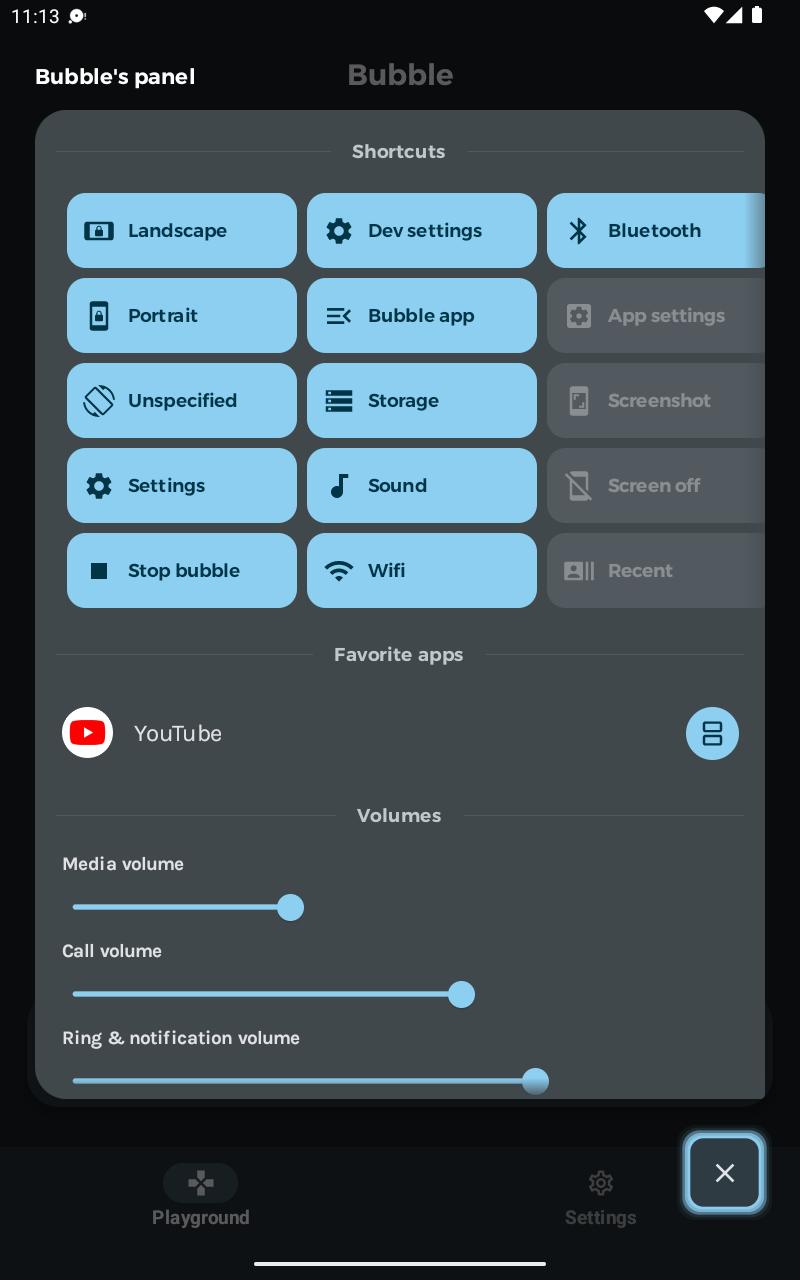
The bubble app also let you control you device like the iOS Assistive Control.
★ What is Assistive Control?
It is a tool that let you control your device via a floating popup over your other applications.
To start the floating panel, a floating bubble stays over your other applications.
Like that, no need to comes back on your app launcher.
No need to quit or pause the video your a playing in fullscreen mode. With the bubble app, you can launch shortcut and other apps in split screen mode without leaving your video.
★ Material You support
If your device is on Android 12 or above, the app is using the Material You.
The color of the bubble, the panel and colors inside the app will match your current wallpaper.
★ Shortcuts included in the app
- Home, back, recent apps, buttons
- Volumes control
- Settings: Wifi, Bluetooth, Storage
- Screenshot
- Split screen
- Power dialog
- Screen rotation / Screen orientation
- App launcher and game launcher
★ Setup the app
- Change your favorite applications from the settings inside the Bubble app
- Change the double tap action for more convenience (designed for people with disabilities).
Permissions required by the app to get the full experience
- Overlay permission ("SYSTEM_ALERT_WINDOW" and "ACTION_MANAGE_OVERLAY_PERMISSION"): Be able to display over other application. This permission is required for the bubble and panel to be over other applications.
- Accessibility services (IsAccessibilityTool): This app uses Accessibility services to let you performed shortcuts designed for people with disabilities that cannot do otherwise with the default operating system.
- Query your application list ("QUERY_ALL_PACKAGES"): Required to be able to list your apps as shortcut and let you launch the app you want from the floating panel
Questions often asked:
- How to uninstall the app? Answer: From the Bubble's panel, long click on the bubble app will open the settings page with the uninstall button.
- How to perform split screen? Answer: From the Bubble's panel, on the app you want to launch in split screen mode, there is an icon to start the split screen (only on Android 7 or above)
Why does this app exist?
To help people and speed-up daily task with shortcut. The floating panel will make some actions easier for elderly or people with infirmity or disabilities. Enjoy =)
Latest Version
1.00.20Uploaded by
قيس الجابري
Requires Android
Android 5.0+
Category
Free Tools AppContent Rating
Everyone
Security Report
Report
Flag as inappropriateLast updated on Jul 10, 2024
Minor bug fixes and improvements. Install or update to the newest version to check it out!



APKPure - A multi-platform app store primarily focused on Android, providing extensive app-related content. Discover the app you want easier, faster, and safer, with quick and efficient downloads and installations.